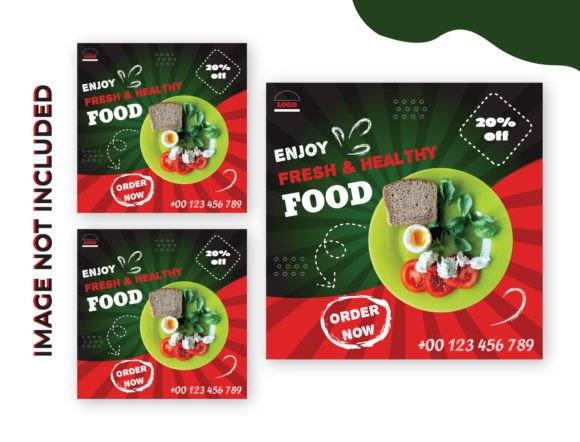
Streamline Your Visual Strategy with a Food Social Media Ad Template
In the fast-paced world of digital marketing, particularly within the food and beverage industry, visual consistency is currency. Whether you are a restaurant owner, a food blogger, or a niche e-commerce store, the ability to produce high-quality graphics quickly can make or break your engagement rates. This is where the utility of a robust Food Social Media Ad Template becomes undeniable. Designed specifically for Adobe Illustrator CC, this asset is more than just a static image; it is a dynamic EPS file built for professional customization.
The core appeal of this template lies in its technical precision and ease of use. Created in RGB color mode, it is optimized for digital screens, ensuring your colors pop on Instagram, Facebook, and Pinterest feeds. The vector nature of the EPS format means you can scale your designs to fit anything from a small Instagram story to a large web banner without losing resolution. However, the true power for designers and marketers lies in the editability. Unlike rigid JPG or PNG templates, this file allows you to deconstruct the layout, rearrange elements, and truly make the design your own.
Mastering the Layers for Maximum Efficiency
One of the most common hurdles in using professional design assets is navigating complex layer structures. This Food Social Media Ad Template is structured to be intuitive, but it requires a basic understanding of vector manipulation. To fully unlock the potential of the design, you will need to ungroup the layers. This is a simple process: just press Shift+Ctrl+G on your keyboard.
Why is ungrouping so important? When you ungroup the layers, you isolate individual elements. This allows you to move the decorative flourishes, change the background colors, or adjust the placement of the food photography area without affecting the rest of the composition. For content creators and small business owners, this level of control is vital. It transforms a generic template into a custom piece of brand identity collateral. You aren't just filling in blanks; you are curating a visual experience that matches your specific menu or product launch.
Typography That Speaks to Your Audience
Text is the bridge between the visual appeal of your food image and the information your audience needs. The Food Social Media Ad Template is designed with placeholder text, but the real magic happens when you install your own fonts. The instructions are straightforward: download the required fonts, install them on your system, click the text, and replace it with your own copy.
This is where the nuances of modern typography come into play. The template likely utilizes a mix of display font styles—perhaps a bold sans serif font for the headline to grab attention, paired with a softer script font or handwritten font for accents. When editing, pay close attention to readability. A premium font adds sophistication, but if the kerning is too tight or the size is too small, the message gets lost on a mobile screen.
Consider the hierarchy. Your main offer (e.g., "50% Off Burgers") should be the dominant text element, utilizing a heavy weight typeface. Supporting details, like the date or location, should use a lighter weight or a complementary serif font. This template provides the canvas, but your choice of font pairing determines the personality. A rustic, distressed font might suit a BBQ joint, while a clean, geometric sans-serif fits a modern vegan café.
Visual Hierarchy and Image Placement
The instructions to "click on the image to relink place your image then save" sound simple, but the strategic placement of photography is a critical component of social media graphics. The template is designed with a specific visual flow in mind, guiding the viewer’s eye from the headline to the image, and finally to the call to action.
When you place your image, ensure it aligns with the composition. If the template has a circular frame, use a photo with a tight crop on the food item. If it uses a full-bleed background, select a high-resolution image that isn't too "busy," ensuring your text remains legible. This is a common principle in packaging design and editorial design: the image supports the text, it doesn't compete with it.
Furthermore, the RGB color mode of the file ensures that your food photography retains its vibrancy. Food marketing relies heavily on color psychology—reds and yellows to stimulate appetite, greens to suggest freshness. By utilizing this design asset, you ensure that your color values remain consistent across your web design and social channels, reinforcing your brand identity.
Practical Applications for Entrepreneurs and Creatives
This template is not just for professional graphic designers. It is a vital tool for entrepreneurs, bloggers, and hobbyists who need to produce professional-looking content without a steep learning curve.
- For E-commerce and Retail: Use the template to create consistent product ads for Facebook. The ability to edit the EPS file means you can create a series of ads for a seasonal sale, changing only the product image and specific text while maintaining the core layout.
- For Content Creators: If you are a food blogger, use this to promote your latest recipe. The professional layout helps establish authority, making your content look more like a publication than a casual post.
- For Local Restaurants: Update your daily specials or happy hour graphics quickly. The "easy to edit" nature means your staff can potentially handle the updates if you provide them with the installed fonts and a quick tutorial on ungrouping layers.
Evaluating Fit and Commercial Licensing
Before integrating this Food Social Media Ad Template into your workflow, it is wise to evaluate its fit for your specific project. Look at the style of the included graphics. Is the aesthetic modern, vintage, minimalist, or rustic? Ensure it aligns with your existing brand identity.
Additionally, consider the licensing. Since this is a digital download, check the terms for commercial font usage if the template includes specific typefaces (though usually, you are directed to download them separately). Always ensure that the assets you use for commercial client work or business advertising are cleared for such use.
Ultimately, this creative font compatible template serves as a bridge between amateur content and professional marketing materials. By mastering the simple technical steps—ungrouping layers, installing fonts, and relinking images—you gain a powerful tool for visual storytelling. It saves time, ensures visual consistency, and allows you to focus on what matters most: the food and the story behind it.